PDF to Excel
Convert any PDF to Excel in minutes. Extract tables, financial statements, and structured data into a clean, formula-ready workbook — no manual copy-pasting required.

Trusted by 1,000+ finance professionals across PE, VC, growth equity, real estate, and hedge funds.
Built for finance teams doing high-stakes work
Private Equity
Pull operating metrics, add-backs, and KPI tables from CIMs and diligence files into Excel models.
Hedge Funds
Extract data from filings, investor presentations, and earnings materials for faster research workflows.
Real Estate
Convert rent rolls, offering memorandums, and lender packages into clean, analyzable spreadsheets.
Investment Banking
Standardize financial statement tables from PDFs into workbook-ready tabs for comps and modeling.
How PDF to Excel Conversion Works
Upload your PDF
Drag and drop any PDF — financial statements, reports, or data tables — into your Compound drive.
Ask for what you need
Tell the AI Analyst exactly what data to extract: specific tables, ranges, or entire documents. It understands financial context.
Get a clean Excel workbook
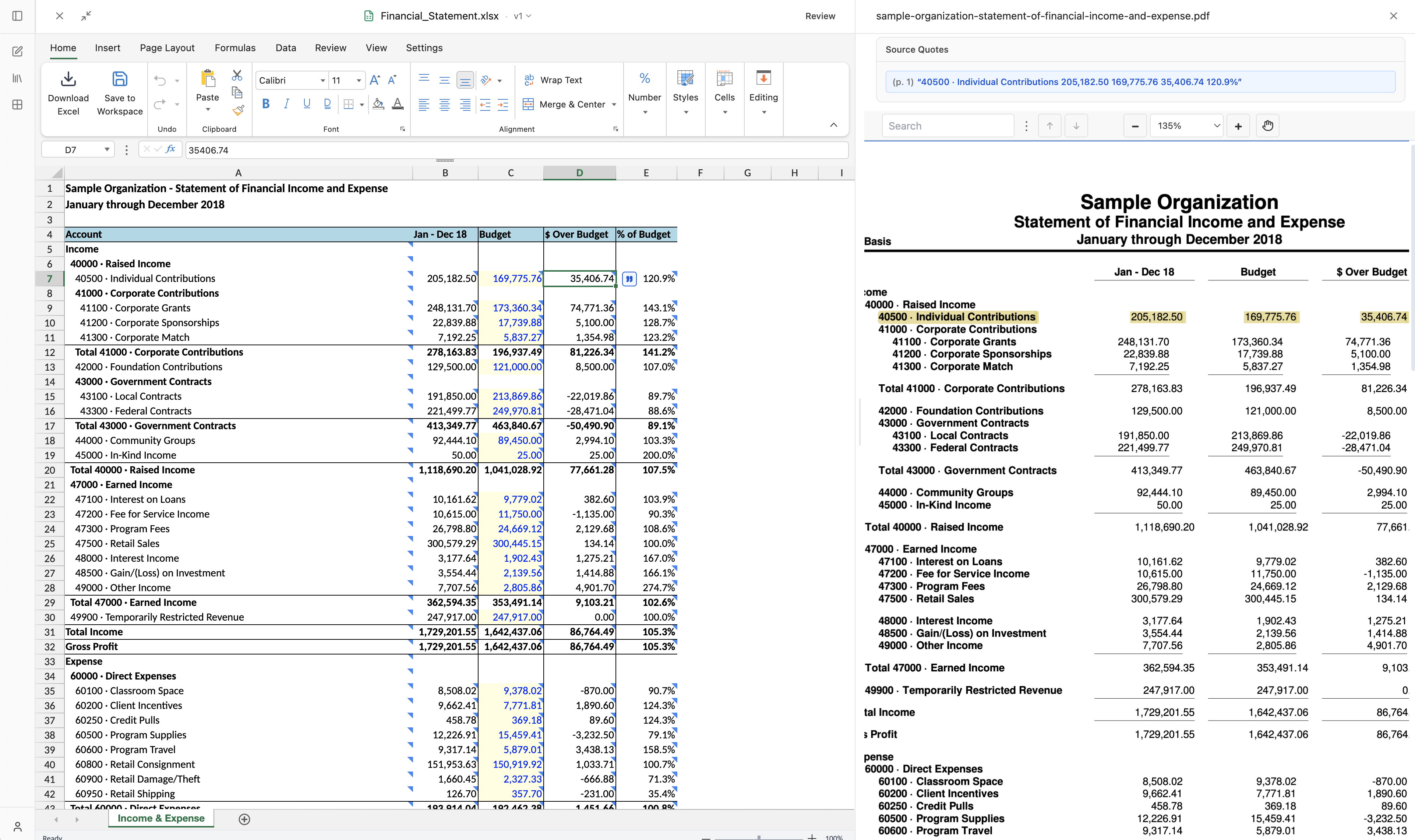
Receive a structured Excel workbook with proper formatting and cited sources — every extracted value traces back to the original PDF.
Why Converting Financial PDFs to Excel Is Hard
Most PDF to Excel tools are built for simple invoices and forms — not the complex, high-stakes documents finance professionals work with every day.
Complex table layouts
Financial statements use nested headers, merged cells, subtotals, and multi-level indentation. Generic OCR tools flatten this into plain text, losing the hierarchical structure that gives numbers their meaning.
Multi-page tables
A single table in a CIM or 10-K often spans multiple pages with repeated headers and varying column widths. Most tools treat each page independently, fragmenting the data.
Mixed document quality
Data rooms contain a mix of natively digital PDFs and scanned documents — sometimes even within the same file. Each requires a different extraction approach, and most tools only handle one well.
Context-dependent values
The number "1,250" could be revenue in millions, headcount, or square footage. Without financial context, extraction tools can't format, categorize, or place values correctly in a model.
Why Compound Excels at PDF to Excel
Financial-grade accuracy
Purpose-built for financial documents. Compound understands P&L layouts, balance sheets, and multi-year tables that generic PDF to Excel converters mangle.
Cited sources, not black boxes
Every extracted value cites the exact page and location in the source PDF, so you can verify any number with a single click.
Batch processing
Upload dozens of PDFs to a single drive and convert them to Excel across all of them in one conversation — no file-by-file tedium.
From any PDF to a formula-ready workbook
What you can upload
- Scanned PDFs and native PDFs
- 10-Ks, 10-Qs, annual reports, and filings
- Financial statements and footnote tables
- Data room files and investor materials
What Compound produces
- Structured tabs and clean headers
- Correct number formats and typed cells
- Formula-ready workbook layout
- Citations back to source pages
For finance workflows, the difference is not just speed. It's reliability and auditability.
Manual copy/paste
- Table structure retention
Fragile and time-consuming
- Financial context understanding
Depends on analyst effort
- Citation traceability
Manual note-taking required
- Batch processing
One file at a time
- Output quality in Excel
Inconsistent formatting
Generic OCR tools
- Table structure retention
Often breaks on complex tables
- Financial context understanding
Limited context awareness
- Citation traceability
Usually unavailable
- Batch processing
Limited multi-file workflows
- Output quality in Excel
Requires heavy cleanup
Compound
- Table structure retention
Reliable on financial table layouts
- Financial context understanding
Built for financial documents
- Citation traceability
Span-level citations by default
- Batch processing
Analyze dozens of PDFs in one drive
- Output quality in Excel
Clean, formula-ready workbooks
Upload a sample PDF and see the output in minutes
Auditable Excel output for financial workflows
Compound is built for analysts who need to verify every number before it reaches investment memos or IC discussions.
Span-level citations
Every extracted value can be traced to the exact source page.
Structured, typed cells
Dates, percentages, currencies, and numbers are placed in the right format for downstream work.
Formula-ready workbook output
Outputs are ready for your own assumptions, sensitivity analysis, and model extensions.
Fast human verification
Review and validate extracted tables quickly without hunting through the original PDF.
Frequently Asked Questions
Compound handles scanned documents, native PDFs, financial filings (10-Ks, 10-Qs), pitch decks, data room files, and more. It uses multi-modal processing for industry-leading accuracy on complex table layouts.
Yes. Compound generates Excel files with proper cell formatting, number types, and formulas. You get a workbook you can immediately audit and extend, not a flat paste of values.
You can upload hundreds of files to a single drive. Compound's infinite-context architecture lets the AI search across all of them to find and extract the data you need.
Compound is SOC 2 Type II certified with AES-256 encryption at rest and in transit. Your documents are never used for model training, and VPC deployments are available for maximum security.
Yes. Compound processes both native and scanned PDFs using multi-modal AI that reads the visual layout of each page. Even poor-quality scans with inconsistent formatting are handled accurately.
Compound is optimized for CIMs, 10-Ks, 10-Qs, annual reports, offering memorandums, rent rolls, bank statements, investor presentations, and any PDF with tabular financial data. The AI understands common financial statement structures out of the box.
Generic tools like Adobe Acrobat or Tabula extract tables as flat grids without understanding financial context. Compound understands that 'Revenue' is a line item, preserves hierarchical table structure, and produces formula-ready Excel output with citations back to the source.
Yes. You can tell Compound exactly how to structure the workbook — which tabs, what column headers, how to group line items. You can also upload a template workbook and ask Compound to match its layout and formatting conventions.
Yes. Compound supports PDFs in multiple languages and can extract financial data regardless of the document language, making it suitable for cross-border deal teams and international research.
Related Use Cases
Earnings Transcript Analysis
Extract guidance, key themes, and management commentary from earnings calls in minutes.
Learn more →Data Room Exploration
Read and analyze entire data rooms in a fraction of the time, with AI-powered search and modeling.
Learn more →Customer Cohort Analysis
Segment customer data into cohort tables, retention curves, and revenue waterfalls automatically.
Learn more →