Build Customer Cohort Analyses with AI
Customer cohort analysis in minutes, not days. Upload raw data, define your segments, and get structured Excel workbooks with retention tables, revenue waterfalls, and churn analysis — complete with real formulas.

Trusted by 1,000+ finance professionals across PE, VC, growth equity, real estate, and hedge funds.
Built for investors and operators who live in the data
Private Equity & Growth Equity
Evaluate customer quality during diligence — build retention cohorts, net revenue retention, and logo churn analysis from raw transaction data in the data room.
Venture Capital
Assess portfolio companies and prospective investments with cohort analysis on subscription data, expansion revenue, and customer lifetime value.
SaaS Operators
Monitor customer health across segments — track cohort retention by plan tier, geography, or acquisition channel with live Excel models you can extend.
Investment Banking
Build customer quality sections for CIMs and management presentations with auditable cohort data, retention metrics, and revenue concentration analysis.
How Customer Cohort Analysis Works
Upload customer data
Drop in raw customer data — transaction logs, CRM exports, subscription records — in Excel or CSV format. Compound understands common data structures automatically.
Define your segments
Tell Compound how to segment: by signup month, plan tier, geography, deal size, acquisition channel, or any dimension in your data. Describe what you need in plain English.
Get cohort models in Excel
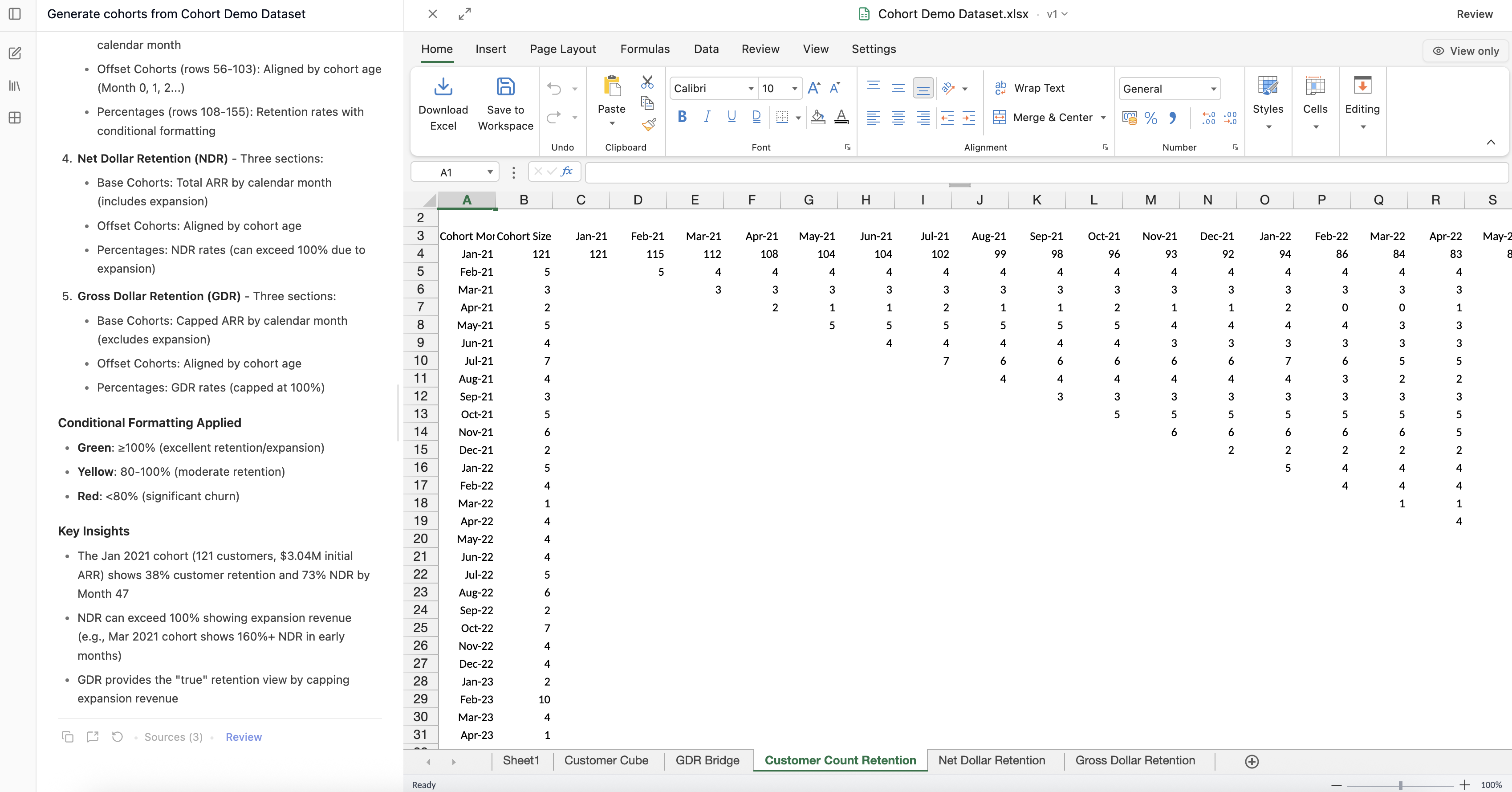
Receive structured Excel workbooks with cohort retention tables, revenue waterfall charts, and churn analysis — complete with real formulas you can audit and extend.
Why Customer Cohort Analysis Is Still Manual
Building cohort analyses is one of the most time-consuming tasks in investment diligence and SaaS operations — and the tools haven't kept up.
Raw data requires heavy cleanup
Customer data arrives as messy transaction logs, CRM exports, and billing records with inconsistent formats, missing fields, and duplicate entries. Hours are spent just getting the data into a usable state.
Pivot tables don't scale
Excel pivot tables work for simple cuts, but building multi-dimensional cohort analyses with retention curves, revenue waterfalls, and churn by segment requires complex formulas that take hours to build and debug.
Every new cut starts from scratch
Want to re-segment by geography instead of plan tier? Or add a new dimension? In a manual workflow, that means rebuilding the entire analysis from scratch — another round of formulas, formatting, and verification.
Results are hard to audit
After hours of pivot tables and VLOOKUP chains, it's difficult to verify that the final cohort numbers are correct. One wrong filter or formula error can invalidate the entire analysis.
Why Compound Excels at Customer Cohort Analysis
Any segmentation in plain English
Cut data by any dimension — time, geography, plan, deal size, acquisition channel — just describe what you need. No formulas to write, no pivot tables to configure.
Real Excel formulas, not pasted values
Cohort tables come with real Excel formulas, so you can tweak assumptions, extend the analysis, and audit every calculation. The output is a model, not a screenshot.
Iterative refinement in conversation
Adjust segments, add new dimensions, exclude outliers, or drill into a specific cohort — all in the same conversation. Each new cut builds on the previous analysis instead of starting over.
From raw customer data to structured cohort models
What you can upload
- Transaction logs and billing records
- CRM exports (Salesforce, HubSpot, etc.)
- Subscription and renewal data
- Customer metadata (geography, plan, segment)
What Compound produces
- Cohort retention tables with formulas
- Revenue waterfall charts by period
- Churn and expansion analysis
- Multi-dimensional pivot tables
Upload your customer data and get cohort tables in minutes
Frequently Asked Questions
Compound accepts Excel files (.xlsx, .csv, .tsv) and can read customer data from PDFs or other documents. The AI understands common data structures and can clean messy datasets automatically.
Yes. Tell Compound how you want to segment — by month, quarter, geography, plan tier, deal size, or any column in your data. You can also ask for multi-dimensional cuts that combine multiple dimensions.
Yes. Compound generates cohort retention tables with proper Excel formulas and can create visual retention curves as charts within the workbook — ready for IC presentations or board decks.
Absolutely. Ask follow-up questions to refine segments, add new dimensions, exclude outliers, or drill into a specific cohort — all within the same conversation. Each iteration builds on the previous work.
Compound can clean and normalize raw data automatically — handling duplicate entries, inconsistent date formats, missing fields, and other common data quality issues. It tells you what it found and how it resolved it.
Yes. Compound can calculate NRR, gross retention, logo retention, expansion revenue, and contraction by cohort — all in structured Excel with formulas so you can verify and extend the analysis.
Customer cohort analysis is critical for PE and growth equity diligence. Compound lets you upload raw customer data from a data room and instantly build retention cohorts, revenue quality analysis, and customer concentration metrics with cited sources.
Yes. Compound can build side-by-side cohort comparisons across any dimension — enterprise vs SMB, US vs international, organic vs paid — so you can identify which segments drive the best retention and expansion.
Compound outputs real Excel formulas — not pasted values. Every cohort table, retention calculation, and revenue waterfall uses traceable formulas, so you can audit the logic and extend the model with your own assumptions.
Related Use Cases
PDF to Excel
Extract tables and financial data from PDFs into clean, formula-ready spreadsheets.
Learn more →Earnings Transcript Analysis
Extract guidance, key themes, and management commentary from earnings calls in minutes.
Learn more →Data Room Exploration
Read and analyze entire data rooms in a fraction of the time, with AI-powered search and modeling.
Learn more →