Analyze Earnings Transcripts with AI
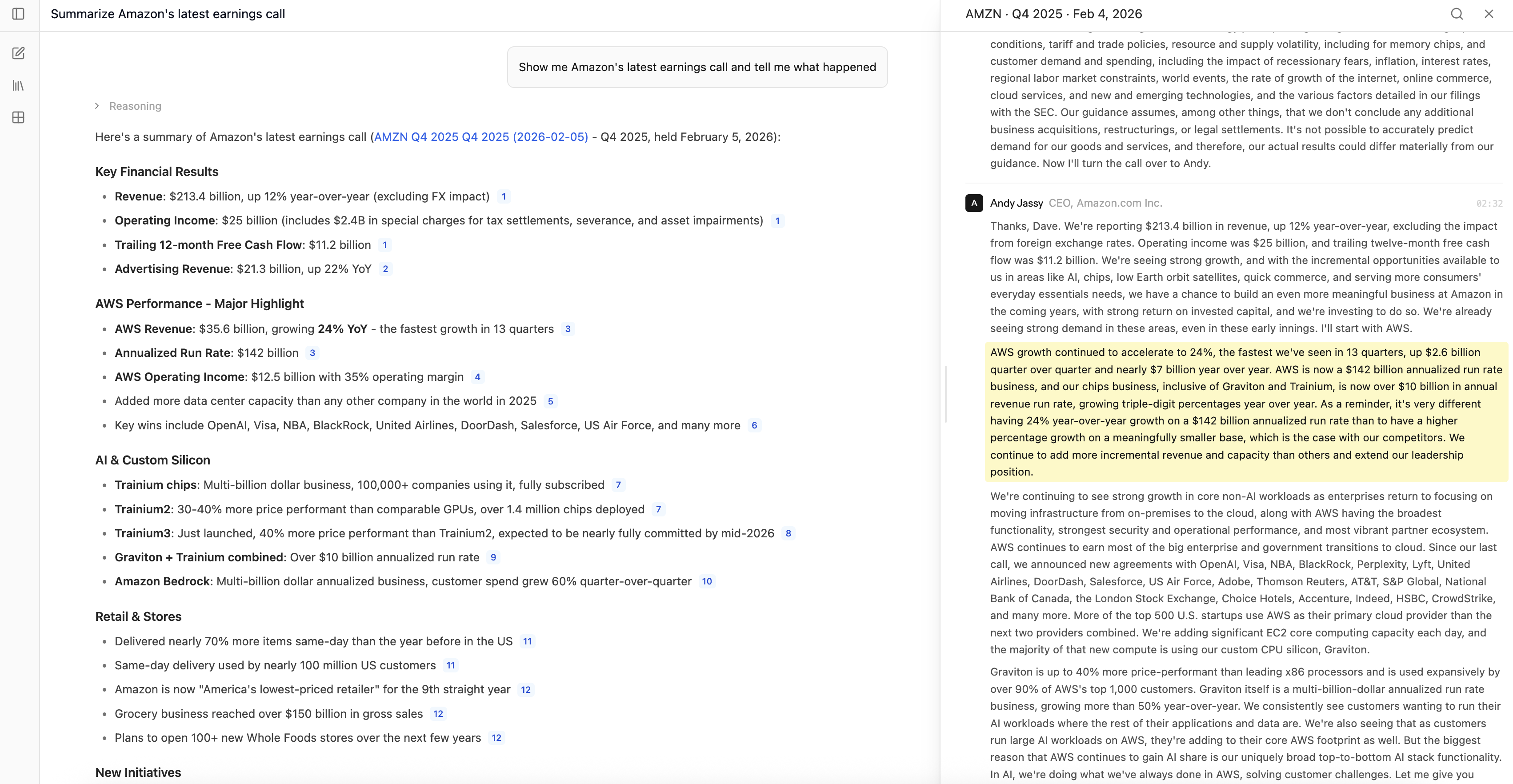
Earnings transcript analysis in minutes, not hours. Compound reads transcripts across 14,000+ companies, extracts guidance, and surfaces key themes — all with cited quotes from management.

Trusted by 1,000+ finance professionals across PE, VC, growth equity, real estate, and hedge funds.
Built for investors who live in earnings season
Equity Research
Update models across your entire coverage universe during earnings season. Extract guidance, KPIs, and segment data into Excel in minutes instead of days.
Hedge Funds
Identify alpha signals in management commentary — track tone shifts, language changes, and guidance revisions that the consensus may miss.
Sell-Side Research
Accelerate post-earnings note publication. Summarize key takeaways, extract updated guidance, and compare to prior quarter — all with cited quotes.
Credit Analysts
Monitor leverage commentary, covenant language, and credit quality signals across your coverage universe every earnings season.
How Earnings Transcript Analysis Works
Enable earnings transcripts
Enable the earnings transcript toggle — it's on by default. Compound refreshes daily, so transcripts are available the same day as the earnings call.
Ask your questions
Query across transcripts: compare guidance changes, track management tone on key topics, or extract specific financial metrics quarter over quarter.
Get cited analysis in Excel
Receive structured guidance tables and Excel models with direct citations back to the source transcript, so every data point is auditable.
Why Earnings Season Is Still a Grind
Analysts spend entire weeks during earnings season reading transcripts, yet most still rely on manual workflows that haven't changed in a decade.
Hours of reading per company
A single earnings call transcript runs 20–30 pages. Covering 30+ companies means 600+ pages of dense commentary every quarter — and the window to act on it is days, not weeks.
Guidance buried in commentary
The actual numbers — revenue guidance, margin outlook, capex plans — are scattered through prepared remarks and Q&A. Finding specific metrics means reading through pages of narrative context.
No cross-company querying
Terminal tools let you search within a single transcript, but you can't ask questions across your coverage universe. Comparing guidance changes across 10 companies means reading 10 transcripts manually.
Manual Excel entry after review
After reading each transcript, analysts still manually type guidance numbers into their models. Copy-paste from PDF or web into Excel, reformat, verify — for every company, every quarter.
Why Compound Excels at Earnings Transcript Analysis
Cross-company querying at scale
Ask one question across your entire coverage universe. 'Which semiconductor companies raised revenue guidance this quarter?' — one prompt, cited answers across all companies.
Cited quotes, not AI summaries
Every insight links back to the exact quote from the CEO or CFO. When Compound says management guided FY25 revenue to $4.2B, you can click to see exactly what they said.
Direct to Excel with formulas
Terminal tools give you a text transcript. You still build the model manually. Compound outputs structured guidance tables, KPI trackers, and margin trends directly into Excel.
Traditional earnings transcript analysis involves expensive subscriptions, manual exports, and no Excel integration.
Manual review
- Transcript access
Source individually
- Cross-company queries
Read each transcript individually
- Guidance extraction to Excel
Manual copy-paste
- Freshness
Depends on source
- Citation traceability
Manual note-taking
Terminal tools
- Transcript access
Separate subscription required
- Cross-company queries
Limited search and filtering
- Guidance extraction to Excel
Export to CSV, reformat manually
- Freshness
Varies by provider
- Citation traceability
Link to transcript page
Compound
- Transcript access
14,000+ companies built in
- Cross-company queries
Ask questions across your entire universe
- Guidance extraction to Excel
Structured Excel with formulas
- Freshness
Daily refresh, same-day availability
- Citation traceability
Cited quotes from source text
Analyze your first earnings call in minutes
Frequently Asked Questions
Compound automatically pulls earnings transcripts for publicly traded companies, refreshing daily so new transcripts are available the same day as the call. Just enable the toggle and start asking questions.
Compound covers 14,000+ public companies globally, spanning all major exchanges and geographies. Whether you're analyzing US mega-caps or international small-caps, the transcripts are already available in Compound.
Yes. Compound lets you run earnings transcript analysis across your entire coverage universe, so you can ask cross-company questions — like which companies raised or lowered guidance on a specific metric.
Absolutely. You can ask Compound to pull specific guidance metrics into an Excel workbook, tracking changes across quarters with proper formatting and formulas — no manual data entry required.
Compound provides citations for every claim, linking each insight back to the exact quote in the source transcript. You can verify any data point against the original management commentary with a single click.
Yes. Compound can compare guidance across multiple quarters for any company, showing exactly how revenue targets, margin outlook, or capex plans have shifted — with cited quotes from each earnings call.
Terminal tools let you read individual transcripts and search within them. Compound lets you analyze across transcripts — ask cross-company questions, extract guidance into Excel, and get cited answers. No separate transcript subscription required.
Yes. Compound covers companies across major global exchanges. Transcripts are available regardless of geography, and Compound can analyze earnings calls in multiple languages.
Compound refreshes transcripts daily with same-day availability, so new earnings call transcripts are ready to analyze as soon as they're published. Teams use Compound throughout earnings season to stay on top of their coverage universe.
Related Use Cases
PDF to Excel
Extract tables and financial data from PDFs into clean, formula-ready spreadsheets.
Learn more →Data Room Exploration
Read and analyze entire data rooms in a fraction of the time, with AI-powered search and modeling.
Learn more →Customer Cohort Analysis
Segment customer data into cohort tables, retention curves, and revenue waterfalls automatically.
Learn more →